


Ski Tracks
3.8887.00 Reviews
App Specs
- Version
- Varies with Device
- Updated On
- License
- Free
- Downloads
- 500,000+
- Developer
- Fitness & Sports apps
- Categories
- Sports
- Platform
- Android, iOS
Screenshots
 Analysis by AppCompare
I like having a record of a ski day that goes beyond a few phone photos, and Ski Tracks is built for that particular purpose. It turns a phone into a way to review how the day unfolded, with details such as speed, distance and altitude. I find that most useful after a run or back at the lodge, when I can look over the day rather than fiddle with a screen on the lift.
What the free access gives you
The app is free to download, so you can try its basic appeal without paying upfront. It also offers in-app purchases priced from $4.99 to $49.99 per item. I’d treat those as a reason to check the purchase options in the app before committing, rather than assume a particular paid item is necessary or that every feature is included at no cost. The practical question is whether the tracking you want is useful to you before you spend anything.
It is a sports app from Fitness & Sports apps, and it has been available since January 12, 2013. Its Everyone age rating makes it broadly suitable from a content perspective. It has a 3.4 average from around 8.9 thousand ratings, with about 858 written reviews and over 500 thousand installs. Those figures suggest a sizeable audience, but the middling average is a sensible reminder to judge it against your own expectations: GPS tracking can be valuable without being perfect for every phone, resort or skier.
When the numbers earn their place
The real value is not simply seeing a speed figure. I like the idea of using a day’s record to notice patterns: perhaps I spend more time moving between runs than I expected, or a familiar slope feels different at another point in the day. Distance and altitude add context to the headline speed, making the log more like a personal training note than a single bragging number.
There is a useful distinction between collecting data and skiing for data. I would start a session, put the phone away securely, and look at the results later. That makes the app a better companion for reflection than an excuse to check a screen while moving. If you are curious about progress, compare days in similar conditions and focus on a broad pattern rather than treating one maximum speed as proof of improvement.
What it does better than a general tracker
A general fitness tracker may cover walks, runs and other activities in one place, which is convenient if skiing is only an occasional outing. This app’s appeal is its narrower focus: its measurements are framed around a ski day, rather than asking you to adapt a generic workout record to the mountain. For someone who wants a dedicated log of slope sessions, that focus feels more natural.
On the other hand, a sports watch or a broader activity platform may suit someone who already tracks every workout and wants all their records together. I would not switch systems just for skiing if a current setup already gives you the review and sharing tools you need. The choice comes down to whether a ski-specific record matters more than keeping everything in one place.
Worth Reading Before You Choose

Flipboard Shows What News Apps Must Do Beyond the Feed

Switching to Android Auto Means Rethinking Your Driving Routine

Google Calendar Makes a Crowded Week Easier to Manage

Ludo King Makes the Most of the Minutes Between Plans

Baby Panda World Brings Quick Play to Modern Phones, but Its Game Library Feels Busy

ESPN’s Live Game View Makes Following Close Games Easier
A realistic day on the mountain
Picture a day with friends where everyone takes different breaks and no one remembers how many runs they managed. I’d use the app to capture the session, leave the phone tucked away, and compare notes over lunch or at the end of the day. The record can settle friendly questions about distance or speed without anyone having to estimate from memory. It can also help make a future day more deliberate: if the group wants a relaxed outing, the log gives a different kind of memory than if someone is working on consistency.
For a more useful comparison, keep the circumstances in mind. A short visit, a long day, changing snow and different routes are not like-for-like sessions. I would use the figures as a personal reference, not as a leaderboard or a safety gauge. The app can describe recorded movement; it cannot decide whether a slope, speed or weather condition is appropriate.
Features That Stand Out
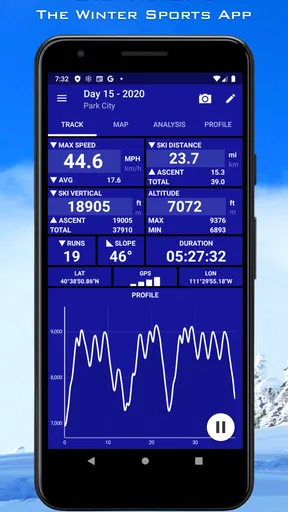
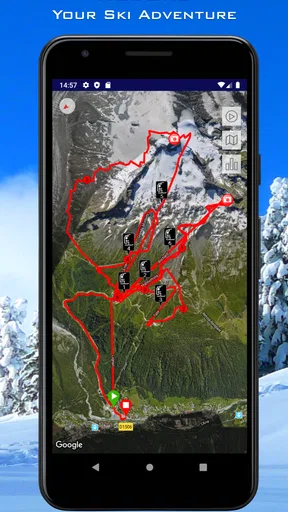
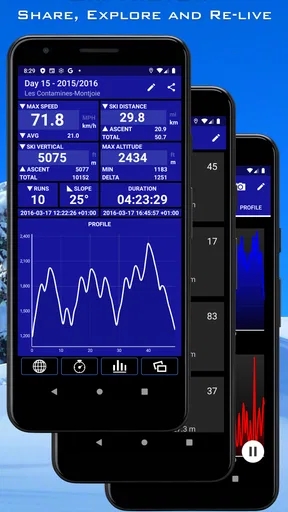
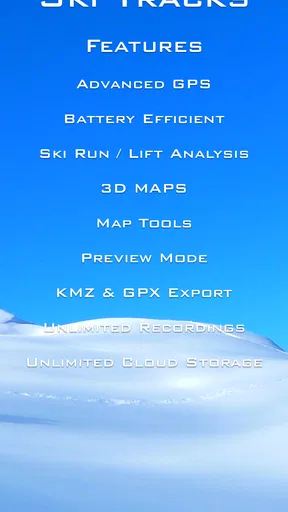
Right off the bat, Ski Tracks impresses with its robust feature set. It’s designed to track your entire day on the mountain, providing detailed statistics about your runs. The app uses your phone’s GPS to log data like speed, altitude, distance, and more. If you’re a data geek like me, you’ll love diving into these numbers at the end of the day. It’s like a personal diary of your ski journey.
One of the coolest features is the ability to track your maximum speed. I’ve had some thrilling moments trying to beat my personal best, and then checking the app to see just how fast I was going. It’s a great way to add a bit of competition with yourself while staying safe.
Usability and Design
The app’s design is clean and intuitive, which is a must when you’re trying to navigate it with cold fingers. The main screen gives a quick overview of the day’s stats, and you can dive deeper into each category with just a few taps. I found it easy to use, even when I was bundled up in my ski gear.
One thing I really appreciate is the offline functionality. No need for data or Wi-Fi once the app is running, which is a lifesaver in remote mountain areas. Just make sure your GPS is on, and you’re good to go!
Sharing Your Adventures
If you’re like me and love sharing your ski adventures, you’ll enjoy the app’s social features. You can easily export your data and share your runs with friends. The app supports integration with popular platforms, so whether you’re boasting about your top speed or the number of runs, you’ve got the tools to show off.
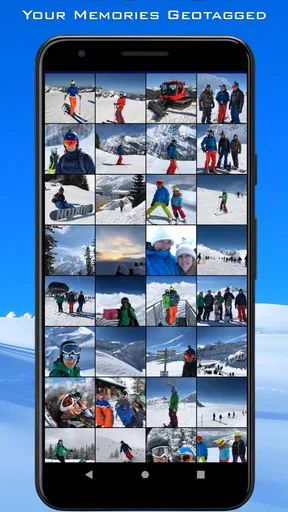
Plus, the app allows you to attach photos and notes to each run, making your ski logs more personal and memorable. It’s like creating a scrapbook of your skiing experiences.
Battery Life Concerns
Now, let’s talk about something important: battery life. It does a decent job of conserving power, but remember, using GPS does drain your battery. I always carry a portable charger just in case, because you don’t want your phone dying on you halfway through the day.
That being said, I’ve managed a full day of skiing with the app running without too much battery anxiety. Just make sure to charge up before hitting the slopes.
Planning around GPS and battery
Before a ski day, I’d charge the phone fully and make sure location services are ready, then start tracking before heading onto the first run. A quick check that recording has begun is worthwhile; after that, I’d avoid repeatedly opening the app. This small routine reduces the chance of discovering at the end of the day that I forgot to start a session, and it avoids turning the phone into a distraction.
Cold weather can make phone battery management more demanding, so I’d keep the device warm and accessible rather than exposed in an outer pocket. A portable charger is useful as a backup, but it is better to plan for the session than depend on charging between runs. If a long day away from shelter is the priority, a dedicated sports watch may be a more comfortable choice than keeping a phone involved.
Reading the record with care
GPS figures are most helpful as estimates for personal comparison, not as laboratory measurements. Trees, terrain, phone placement and the shape of a route can affect how a track looks. If a peak speed seems surprising, I would treat it as a prompt to review the session, not as a reason to chase a higher number on the next run. Safe decisions on the slope should come first, regardless of what a screen records.
For a cleaner record, I’d also make a habit of ending a session when the ski day is over and checking that the day is saved before leaving. This is especially useful if you take a long break or move between activities: a continuous record may be less meaningful if it includes time that was not actually spent skiing. A little care around starting and stopping makes the resulting diary easier to understand.
Who will get the most from it
I’d recommend it to a skier or snowboarder who enjoys reviewing days, comparing personal outings and keeping a record of memorable sessions. It is also a good fit for friends who like swapping details after skiing, or for someone returning to the mountain who wants a personal reference for how active a day felt. You do not need to be a competitive athlete to enjoy the numbers; curiosity about your own habits is enough.
It is less compelling if you only want turn-by-turn navigation, resort information, snow reports or coaching. Tracking a session is not the same as helping you choose a route or teaching technique. Likewise, anyone who does not want to carry a phone or monitor battery on the slopes may prefer a watch designed for outdoor activity. The best choice depends on what you want to do before, during and after a run.
Questions worth considering before installing
Do you need mobile data on the mountain? The app’s offline use is a practical advantage once tracking is running, while GPS still needs to be enabled. I would prepare the app before leaving reliable reception rather than expect an internet connection to be available on the slopes. If you care about sharing afterward, that can be done when you are back online.
Will it work for an occasional skier? In my view, yes, if the appeal is preserving a record of each outing; you do not have to train seriously to benefit. But if you ski only once and have no interest in reviewing statistics, the setup and battery attention may outweigh the value. The free download makes trying it a relatively low-commitment way to find out whether tracking changes how you enjoy a day.
Should you pay for an in-app item? I would first use the free access and identify a specific limitation you want a purchase to solve. The available purchase range is broad, so I would inspect the item descriptions and confirm the value for my own use rather than assume an upgrade is essential. If the basic session record already satisfies you, there is no reason to buy simply because an option is present.
Final Thoughts
All in all, this is a capable app for anyone who loves skiing and snowboarding. It’s packed with features, easy to use, and makes tracking your ski adventures fun and informative. Whether you’re a beginner or a seasoned pro, you’ll find something to love about this app.
For me, it has become an essential part of my ski gear. Just like I wouldn’t hit the slopes without my goggles, I won’t go without it on my phone. It’s a great way to document your progress, challenge yourself, and keep those memories alive long after the snow has melted.
So, if you’re ready to take your skiing experience to the next level, give it a try. You can download it from the App Store or Google Play. I’d start with a normal day, keep the phone safely tucked away, and see whether reviewing the record adds something you actually enjoy. If you mainly want a simple, all-purpose workout tracker or do not want GPS running on your phone, another option may suit you better; for ski-focused memories and personal comparisons, this one is worth trying.
Pros
- Accurate GPS tracking for ski routes.
- Detailed statistics on speed and distance.
- Offline functionality for remote areas.
- Easy-to-use interface for quick setup.
- Battery-efficient performance.
Cons
- Limited social sharing options.
- No real-time weather updates.
- Premium features require purchase.
- Occasional GPS signal loss in valleys.
- Lacks integration with fitness apps.
FAQs for Ski Tracks
What features does Ski Tracks offer for skiers and snowboarders?
Ski Tracks provides a comprehensive tracking experience for skiers and snowboarders. It records your speed, distance, and altitude, and maps your entire route using GPS. The app also includes features like detailed statistics, photo integration, and social sharing, allowing you to document and share your adventures with friends. Its offline capability ensures functionality even without data connectivity on the slopes.
Is Ski Tracks available on both Android and iOS devices?
Yes, Ski Tracks is available for both Android and iOS users. You can download it from the Google Play Store for Android devices and the App Store for iOS devices. It is designed to deliver a seamless experience across both platforms, ensuring you have access to all features regardless of your device.
How does Ski Tracks perform in areas with poor or no network coverage?
One of the standout features of Ski Tracks is its ability to function offline. The app uses GPS to track your skiing activities, which means it doesn’t rely on cellular data or Wi-Fi. This ensures that you can use the app to track your skiing adventures in remote areas where network coverage might be limited or unavailable.
Are there any costs associated with using Ski Tracks?
Ski Tracks offers a one-time purchase option for the full version of the app, which may include additional features not available in the free version. This one-time fee ensures access to all premium features with no recurring subscription costs, making it a cost-effective choice for avid skiers and snowboarders looking for an advanced tracking tool.
How accurate is the GPS tracking in Ski Tracks?
Ski Tracks is renowned for its GPS accuracy, providing detailed and reliable tracking of your skiing routes. It consistently captures data on your speed, altitude, and distance, ensuring precise performance analytics. However, as with any GPS-based app, performance can vary slightly based on environmental factors like weather and terrain.


